A digital business card with bookings and sales built in




Pricing
MyVisito and Blinq, at a glance
MyVisitoOurs
- Free plan
- Permanent free plan: a live card, every template and color set, the lead form, the contacts CRM with import, a wallet pass, a QR code, an event with RSVP, and a shop that links to products sold on another site.
- App needed
- Browser, no install
- Fee on each sale
- Premium0%
- Max0%
Blinq
- Free plan
- Two cards, unlimited sharing and contacts, wallet passes, personal email signature, virtual backgrounds.
- App needed
- Browser, iPhone and Android
Every figure here was read from that vendor's own pricing page on October 2, 2026. Prices move, so open the link before you decide.
MyVisito is our product, so this comparison is written by a competitor. We put ourselves first, we say on what basis, we list what we do not do, and every rival figure links back to the page we read it from. Check us.
Comparison
What MyVisito adds to a typical digital card
A typical digital card shares your contact details. With MyVisito, the same card also lets you sell and take bookings, and everyone who reaches out is saved for you.
The card itself
The page itself
Digital business card apps: Contact details, links and a personal profile
MyVisito: A full landing page: services with prices, a gallery, portfolio, videos and testimonials
Sections for your profession
Digital business card apps: The same fields for everyone
MyVisito: A filterable listings board for real estate agents, a menu with allergens for restaurants, a price list with photos, sets for DJs and episodes for podcasters, all in the card's colors
Building with AI
Digital business card apps: You fill in the details yourself, field by field
MyVisito: Tell the AI about yourself and it drafts your card; you can also import an existing site or card
Languages
Digital business card apps: One language per card
MyVisito: One card in several languages, and each visitor sees it in their own
Your address
Digital business card apps: A random app-generated link
MyVisito: Your own short address, myvisito.com/your-name, on the QR code and the wallet pass too
Logo
Digital business card apps: You upload an existing logo
MyVisito: A built-in AI logo studio: a professional logo without hiring a designer
Who sees what
Digital business card apps: One card, the same details for everyone
MyVisito: You choose which details everyone sees. A hidden phone, email or address goes only to someone who taps "Exchange details", leaves their own, and gets your one-tap approval
Sharing
Sharing and saving
Digital business card apps: A link and a QR code
MyVisito: Link, branded QR, Apple and Google Wallet, email signature and backgrounds, and a preview of how you look in their contacts, tags included
Paper card scanning
Digital business card apps: Varies by app, often manual entry
MyVisito: Photograph a paper card and the AI reads name, phone and email straight into your contacts, photo and meeting attached
Selling and events
Selling and payment
Digital business card apps: The page shows, payment happens elsewhere
MyVisito: Digital products and courses paid through Stripe, with the money going to your account; coupons, personal links, and a quick-contact button on every service, product and price-list row
A download for an email
Digital business card apps: A link to a file on a drive
MyVisito: A guide, a set or a file that opens after a name and an email, with a preview clip on the page, and everyone who downloads joins your audience. You can also ask for a follow on Instagram, TikTok or YouTube before the download
Courses and content
Digital business card apps: A separate course platform
MyVisito: Digital courses sold and taught from the card, with a student portal
Appointments and meetings
Digital business card apps: A link to an external calendar
MyVisito: A built-in calendar: your hours and meeting length, visitors pick a slot, you confirm, and both sides get a calendar file
Invitations and RSVP
Digital business card apps: A shared link, no event management
MyVisito: A designed invitation at its own address: RSVPs, automatic reminders, guest messages, and every guest joins your audience
Paid tickets and check-in
Digital business card apps: A separate ticketing system
MyVisito: Ticket types, a sale window, coupons and manual approval, plus door scanning from your crew's phones with a live count. You choose who pays the service fee, and our fee is itemized up front. Confirm the event took place, and the money is on its way the next day
Webinars and online events
Digital business card apps: A Zoom link sent by email
MyVisito: A webinar registration page, and the link goes only to people who registered. A countdown, reminders and a recurring series (daily or weekly until a date) with one registration for every session. The webinar also shows on your card and on Google
Relationships and audience
Enquiry form
Digital business card apps: Name, email and a message
MyVisito: The form opens with "what are you interested in" built from your own services, plus a budget range, your own questions and proposed times for an intro call; enquiries arrive sorted
Leads and contacts
Digital business card apps: Contact exchange
MyVisito: A built-in CRM: every inquiry saved with its context, follow-up reminders and sync to the tools you already use
Answering enquiries
Digital business card apps: Emails scattered around
MyVisito: One inbox for enquiries from the form, the shop, events and meetings, with quick replies by branded email or WhatsApp and the whole thread kept
Subscribe to updates
Digital business card apps: A link to an external form
MyVisito: A Subscribe button on every card: subscribers appear on your list and see what's new on your card on their updates screen
Social followers
Digital business card apps: Social network icons
MyVisito: Your follower count on each platform, right on the card, refreshed automatically where the platform allows it
Visita, AI personal assistant
Digital business card apps: The card only displays information
MyVisito: Visita answers visitors from what your card says, saves their details and asks you when someone wants to meet (from Premium up)
Who else gets the enquiries
Digital business card apps: One account, one person
MyVisito: The person who helps you gets their own login and can't withdraw money, and others (a booking manager, a bookkeeper) can get enquiries by email with no account
Want a detailed comparison with a specific app?
What Blinq is
Blinq is a digital business card app. Its focus is the handover: you share a card, the other person saves your details, and the exchange itself is the product. For people whose goal is a clean, fast introduction, that focus is a strength.
This description was last checked in August 2026. Products change, so check their own site for current details.
How this differs from a typical link page
Whoever taps the link in your bio is interested now, and looking for what to do next.
On a typical link page every button weighs the same, and every tap sends the visitor somewhere else. Your card has one main action, most things happen right inside it, and whoever reaches out is saved.
On a typical link page
Seven links, all the same size, in no particular order. The visitor can't tell what to do, so they do nothing.
How the goal is measuredHere
Every card has one primary goal
One wide button and a few shortcuts, set for your profession. Analytics shows what share of visitors tapped the main button.
On a typical link page
Every tap sends the visitor to YouTube or Instagram, where the feed takes them away.
What happens without leavingHere
The visitor stays on your card
Music and video play inside the card, and people can book a meeting or send a form without leaving it.
On a typical link page
You know there was a click. You do not know who clicked, and there is no way back to them.
My audienceHere
The card keeps everyone who reached out
Whoever leaves details, books or buys joins your audience with a status and a follow-up reminder. Even after three inquiries, they show up once.
On a typical link page
A quiet fee on every sale, a price rise with no notice, and a charge that shows up as a surprise.
Full pricingHere
Every fee, shown up front
You see the exact fee before you sell, and it gets smaller on higher plans. Every payment runs on a secure Stripe page. And you can cancel your plan whenever you like.
On a typical link page
A link tool, a booking tool, a mailing tool, a store. Four subscriptions for one page.
All capabilitiesHere
One plan instead of a subscription stack
Card, links, meetings with an automatic Google Meet link, digital products, courses, events, your audience and analytics, all on one plan. Start free.
On a typical link page
To get your details, the recipient has to install an app or hand over their own details first.
What the recipient seesHere
Opens in any browser
They can save you to contacts or their wallet right away. They can leave their details back, or tap "Not now" and carry on.
What MyVisito adds
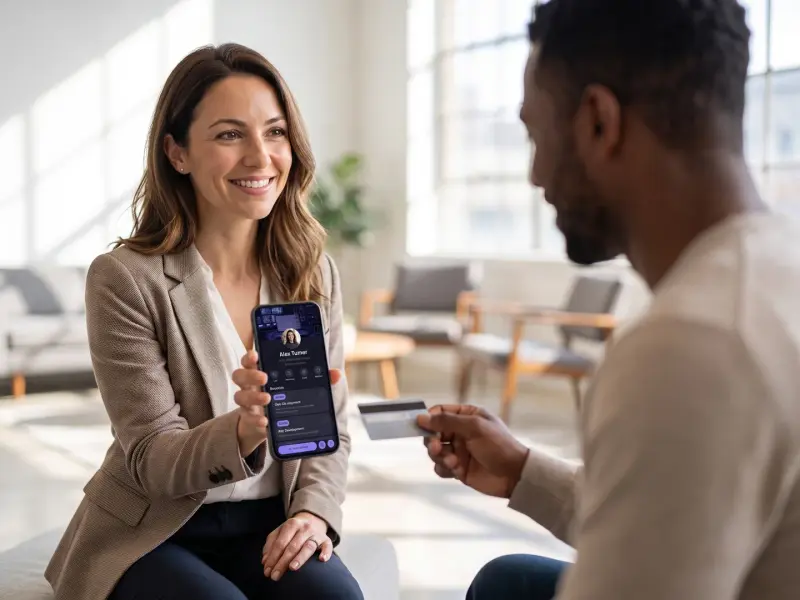
MyVisito starts with the same card and keeps going. On that one link you can also sell courses and digital products, open an appointment calendar and host events with paid tickets.
Selling from the card
Sell courses and digital files straight from your card. Every service gets a quick-contact button.Events with RSVPs
Build an event, send one link, and the RSVPs count themselves with a nudge for whoever forgot.Meeting scheduling
A booking button on the card, with a confirmation and a calendar invite for both sides.Event lead capture
At a booth or a conference visitors leave details in a tap, and the leads land with you.Contacts and CRM
Each name on your list comes with where you met, where things stand and when to get back to them.Card in the phone wallet
Your card goes into Apple or Google Wallet, and onto the home screen too.
A pay button on the card
Someone who wants to work with you can pay right away. Courses and digital products sell from a sales page, and the payment goes through a secure checkout page. A good conversation can end with the money already in.
An event becomes a contact list
People you meet leave their details through the exchange screen or the lead form, and each one lands in your audience with where and why you met. The form opens with "what are you interested in" built from your own services, so the follow-up starts sorted while the event is still warm.
The page starts as an AI draft
Describe what you do and the AI assistant drafts the whole page, with the words, the sections and a design that fits your profession. You change anything by asking, and publishing stays your click.
You see what works
Views, taps, leads, sales and events, per card and per section. When you know which link people actually open, you know what to lead with next time.
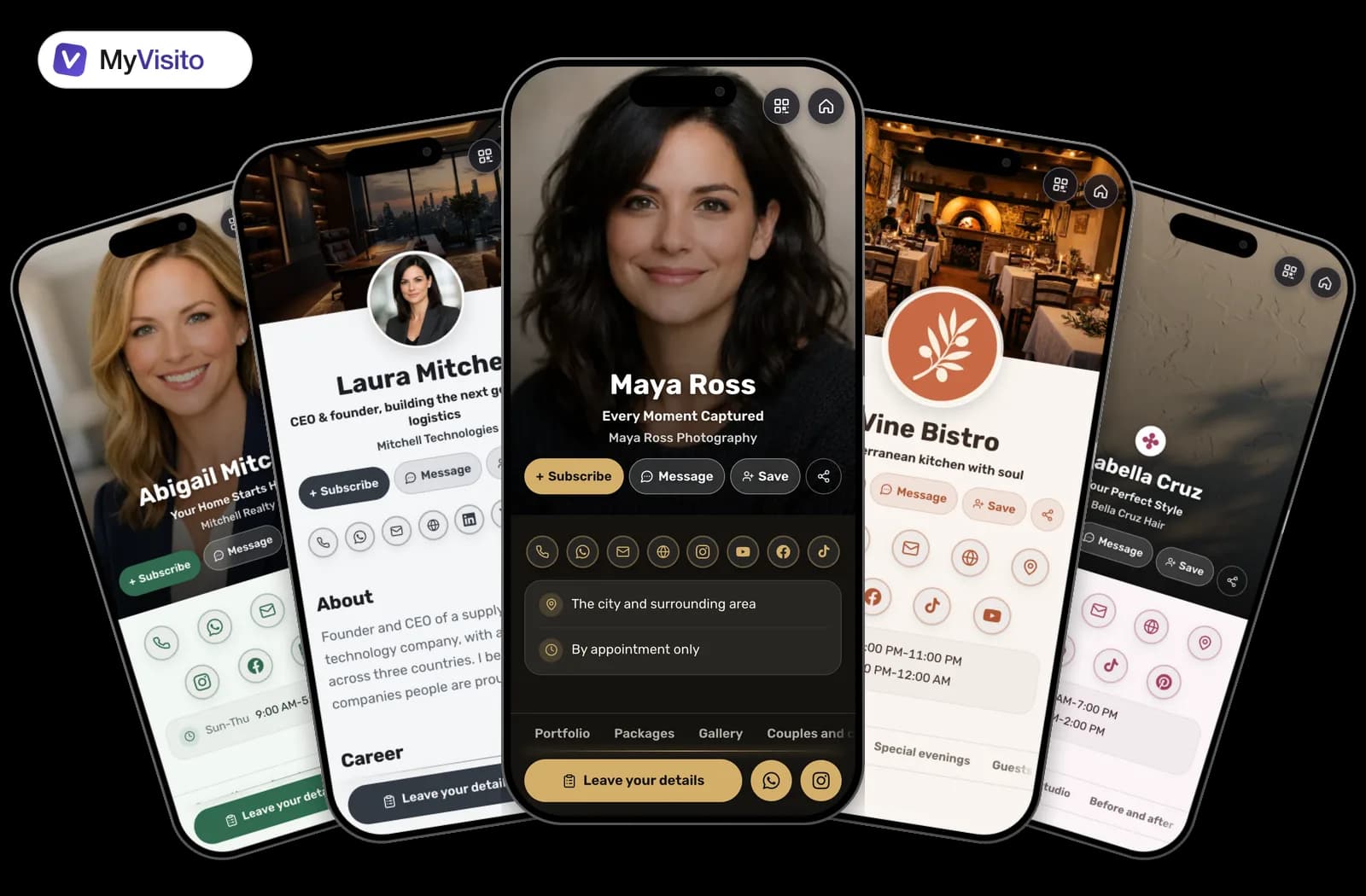
This is what a MyVisito card looks like
Dozens of templates, each one a complete landing page in its own colors.
Which one suits you
Blinq is the more polished app, it has a free plan, and it has years of iteration behind it that we do not. If what you need is a fast, elegant handover with contacts landing in a CRM, that is a good place to stop. MyVisito fits when the page itself has to lead to the next step: a booking, a purchase, an event registration, or an enquiry that arrives already sorted.
Common questions
Can I take payment directly from the card?
Yes. Digital products and courses sell from the card’s own sales page with secure checkout, and the money lands in your account. Services and price lists get a quick-contact button, so an enquiry about a service arrives with the service named.
How are the people I meet at an event saved?
They leave their details themselves, and each one is saved in My Audience with the context of the meeting. From there you can sync them to your tools with the built-in integrations.
Can I host my own events?
Yes. Every event gets a designed invitation at its own address, with RSVP and optional ticket sales, plus automatic reminders on a paid plan. On the day you scan tickets at the door from a phone and watch who is in, live.
What happens when someone wants to book a meeting?
They pick a free slot on a calendar built from the hours and meeting length you set, you confirm, and both sides get a real calendar invitation. Connect your Google Calendar and confirmed meetings land there on their own. A confirmed time closes for everyone else.
Does the card work without an app?
Yes. The card opens in any browser and can be saved straight to contacts, Apple Wallet or Google Wallet. On your side, you can add MyVisito to your home screen and use it like an app.
Does someone who finds me on Google see the same details as someone I gave the link to?
Yes. Everyone who opens your card sees the same version, whether they found it on Google, got your link or scanned your code. The details you chose to hide, such as your phone or address, are not on it. Anyone who exchanges details with you on the card is saved in My Audience, and gets the hidden details once you approve with one tap.
Other comparisons
MyVisito and Popl
Tap sharing versus a page with event tickets and door check-in.
See the full comparison
MyVisito and HiHello
Team cards, compared on sorted enquiries, a calendar and assistant access.
See the full comparison
MyVisito and Linktree
A links page or a full page, with a download for an email, signups and a webinar.
See the full comparison