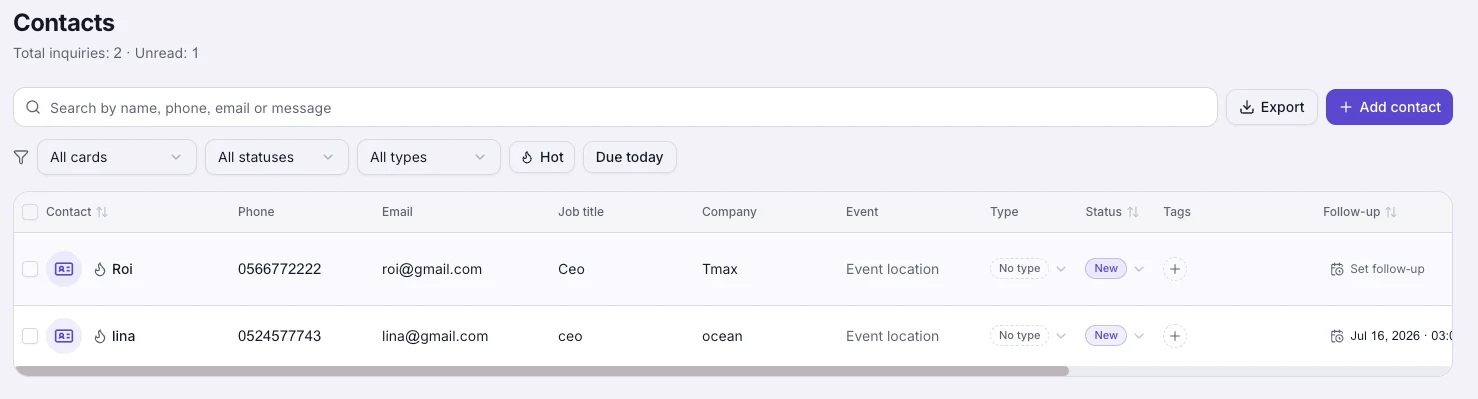
One table showing who's waiting on you
Each contact has a status, tags and a follow-up date, and you edit them right in the table. Star the hot leads, and after a conference, filter by the event.
Contacts come in on their own
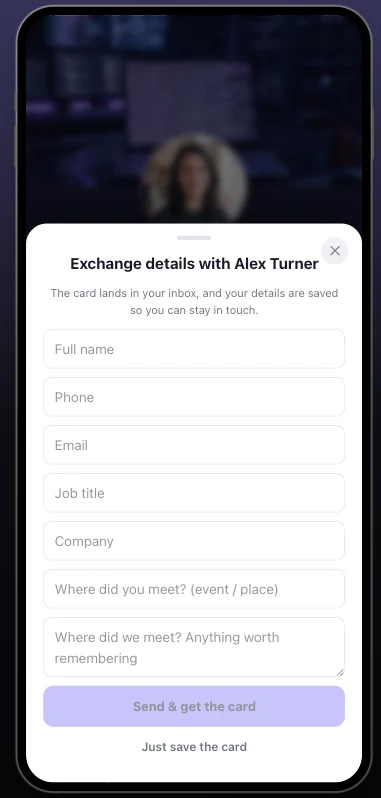
A visitor leaves details on your card, or you scan a paper card at a conference, and the contact shows up with the event where you met. You can add people by hand too, you'll just rarely need to.
A Subscribe button on your card
Anyone who taps Subscribe on your card joins your subscriber list and sees your news on their updates screen. A subscriber who chooses to share a phone number or email shows up in your contacts too. Free on every plan.
A contact form with your own questions
From Premium up, add your own questions to the form, a quote request with a budget range, and call scheduling. People suggest a few times, you confirm one in My Audience, and they get an email with a calendar invite.
Flows into the tools you already use
Connect HubSpot, Salesforce, Pipedrive, Google Sheets, Mailchimp and more, and every new contact syncs automatically, so your team's CRM stays current without copy-paste.
Bring your contacts with you
Upload a CSV or vCard file from HiHello, Blinq, Google Contacts, Outlook or a spreadsheet. Duplicates merge on their own, so importing the same file twice is safe. It's free on every plan.
How it works
Meet people
Exchanges, lead forms, scans and meeting requests flow into your contact book on their own.
Everything is recorded
Six months later, open the contact and you still know who it is and why they matter.
Follow up on time
Pick a day to get back to each contact, and on that day you get a notification and an email. The AI drafts the message from what you saved about them.
Frequently asked questions
How do contacts get into the CRM?
Five ways: visitors leave details through your card's exchange or lead form, you scan paper business cards, you save contacts at meetings with a note, you import a CSV or vCard file, or you add someone manually. Every contact carries its source and, when relevant, the event where you met.
What can I record about each contact?
Status, type, tags, a hot-lead star, the owner on your team, budget, notes, LinkedIn, a follow-up date and where you met. The card photo and original details stay attached.
Will it remind me to follow up?
Yes. Set a follow-up date and on that day you get a notification and an email. Change the date and the reminder moves with it.
Does my team see my contacts?
Owners and managers see the whole workspace; each member sees their own contacts. Leads from a member's card are credited to that member automatically.
Can I export my contacts?
Yes, your contacts are yours: export to CSV anytime, or sync them continuously to your CRM through the integrations.
Do contacts sync to the tools I already use?
Yes. Webhooks, HubSpot, Salesforce, Mailchimp, Google Sheets and more, plus official Zapier and Make apps. New leads are dispatched to your connected tools automatically.
Can I import the contacts I already have?
Yes, and it's free: upload a CSV or vCard file and the import matches people by phone and email. Anyone already on your list gets the new details instead of a second entry.
More MyVisito capabilities
Business card scanner
Photograph a paper card and the AI fills in the contact for you, with the card photo and where you met.AI follow-up messages
A summary of every meeting and a follow-up message drafted in the other person’s language.CRM integrations
Every new lead flows automatically into HubSpot, Salesforce, Google Sheets and more.