One card that speaks 27 languages

Daniel Shaw
Technology That Powers Business
About
Our engineers and designers build digital products that work. We guide companies from idea to launch, with a focus on performance, user experience and long-term stability.
Services



Selected Work


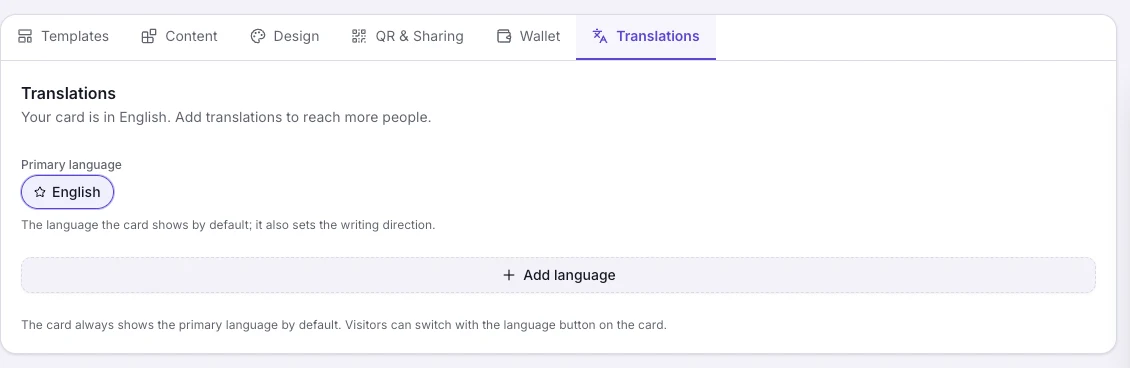
AI translation, editable in every language
Add a language and the copilot translates the whole card, leaving names, numbers and links as they are. Each language is edited on its own, and when you change something, the editor marks the sections whose translation needs an update.
Saved in the visitor's language
A visitor who switches to German saves your contact in German and gets your card by email in German. The wallet pass and the link preview switch too.
How it works
Add a language
Pick any of the 27 supported languages in the editor's language bar.
The copilot translates
Every block is translated while your names, numbers and links stay exactly as they are. Polish any wording by hand.
Visitors switch with a tap
The whole card switches to their language.
Frequently asked questions
How many languages can my card have?
Cards support content in 27 languages, including right-to-left ones like Hebrew and Arabic. How many of them one card can carry depends on your plan. Events, courses and the shop are available in 22 languages: English, Spanish, French, German, Japanese, Hebrew and more.
How do visitors switch language?
There's a language button on the card. Pick a language and the whole card switches, along with everything visitors save or receive from it.
Do I have to translate the card myself?
No. The AI copilot translates your content into each language you add, and you can polish any wording by hand afterwards. Contact details and links are kept exactly as they are.
Does right-to-left actually work?
Yes. Hebrew and other right-to-left languages run right to left across the whole card, and left-to-right languages keep their own direction.
How many languages does the free plan include?
The free plan includes one language, Premium five, and Max all 27. AI translation uses credits based on what it actually costs.
Can I show different content in each language?
Yes. Every section and item (a service, a link, a testimonial, a dish, an event and more) has a "Shown in" row. Switch a language off and that item won't appear for people reading the card in that language, so a testimonial written in Spanish can stay Spanish-only. The editor always shows which language you're editing.