








The guide

The digital business card: what it is and what it can do

A personal page at a permanent address, shared as a link, scanned as a QR code and opened on any phone. This guide covers how it works, what goes on it, and live examples for every profession.

About a 6-minute read

Create your free cardPermanent free plan, no credit card.
Sophia Chen

Sophia Chen

Design That Speaks

Chen Design Studio

Follow

About

We create visual identities that leave a lasting impression. From logos to full campaigns, every project receives deep design thinking tailored precisely to your brand.

Selected work

Services

$2,500
Branding package
Logo, color palette, typography and a brand guide
$4,200
Website design
A landing page or full brand site, designed and built
$1,200
Social media kit
On-brand post and story templates

Digital products

Brand guide
$180
Brand guide
A downloadable file with every brand rule
Icon set
$90
Icon set
120 icons in one consistent line
Online course: branding in ten lessons
$350
Online course: branding in ten lessons
Recorded lessons, instant access and a certificate

Book a time

Pick a time on the calendar
Sun-Thu 9:00-17:00, instant confirmation

Upcoming events

Tue22SeptOpen branding workshopThe studio, Tel Aviv19:30
Open branding workshopTuesday 22 September · 19:30The studio, Tel Aviv

Portfolio

1/4
Branding & Logo
Branding & Logo
Digital Design
Digital Design
Print Design
Print Design
Animation & Media
Animation & Media

What clients say

We rebranded and the result beat every expectation. Professional, attentive, available.

Noa BarakNoa BarakCEO, Bloom

The digital card turns every meeting into an opportunity. Easy to share, easy to remember.

Jonathan CohenJonathan CohenFounder

A bit about us

A boutique studio for branding and digital design. Ten years, hundreds of brands, and a soft spot for the small details.

Start a project?

Sample card for illustration. Names, details, and reviews are fictional.

Chapter 1

What a digital business card is

A personal page on the web, at an address that stays yours. It shows who you are, what you do and how to reach you, and it opens on any phone or computer with nothing to install and no sign-up.

Your address:myvisito.com/your-name
  • Whoever opens the card saves you to their contacts in one tap, photo included
  • Every update reaches everyone who already has your link, instantly
  • A public profile for Google, and a private card with your full details for the people you meet
  • A digital shop: sell a digital product or your own course, with secure payment
  • Events you host, business or private: invitation, RSVPs and ticket payment

Paper card vs. digital business card

Paper card
Digital business card

Forgotten in a drawer or thrown away

Saved on their phone, with your photo, easy to find

Any change of details means a new print run

Change it once, and everyone sees the update

Name, phone and email

Photo, video, services, prices, reviews, booking and buying

No way to know who looked

You see how many opened, saved and tapped, and where they came from

Chapter 2

Why you need a digital business card

Four situations every business owner knows, and what changes with one card.

Someone is opening your link right now. What do they see?

One clean page: who you are, what you offer and the next step. Call, book, order.

You met 30 people at a conference. How many did you follow up with?

Whoever scans you leaves their details in one tap. You know where you met and what you agreed, and you have someone to call back.

Someone is interested. What is their next step?

Book a meeting, leave details or buy, straight from the card. No searching for you.

How many tools do you keep to receive a single payment?

A website, a link page, a calendar, a course platform and a payment provider. Here it is one page, and the basic plan is free.

Chapter 3

How you create a digital business card

  1. Describe yourself in a sentence

    "Interior designer in New York, small apartments a specialty." That is enough. You can also paste a link to an existing profile, and the details are pulled from it.

  2. The AI copilot builds the card

    Within seconds you have a designed page: headline, text, contact details, sections for services and work. Change anything with a click, swap the template and colors, and it all saves by itself.

  3. Share it

    The link on WhatsApp, the QR code on the counter, the card in your phone wallet and email signature. Whoever opens it saves you in one tap.

MyVisito Copilot
Mei-Ling Zhao

Mei-Ling Zhao

Design That Tells Your Story

Lumen Studio

Follow
Save contact

The card that was just built, live and scrollable

Sample card for illustration. Names, details, and reviews are fictional.

Builds a complete card from your description: copy, structure, and design

Edit anything with a plain request, in your own words

Translates your entire card into more languages

Answers questions and guides you at every step

The editor: copilot, sections and live preview on one screen.

Chapter 4

What goes on a digital business card

The card is the foundation. Each capability switches on separately, as your business needs it.

Your personal page

Suited to: Any professional or business owner who wants one place that shows who they are and what they do.

  • Dozens of designed templates, with colors and fonts to pick from
  • Sections such as: about, services, gallery, videos, reviews, price list and links
  • The card shows in the language of whoever opens it
Included in the free planRead the full page

Sharing: QR, phone wallet and email signature

Suited to: People who meet people every day: meetings, conferences, the counter, the clinic.

  • A branded QR code to print, and a code to show from your phone
  • The card in Apple Wallet and Google Wallet, even offline
  • An email signature and video-call background with your details and link
Included in the free planRead the full page

Services, price list and a digital shop

Suited to: Service providers, consultants, therapists and creators who want people to see the offer and buy on the spot.

  • Digital products and courses with secure payment, and a sales page at its own address
  • Services and a price list with a quick-contact button: WhatsApp, leave details or book a time
  • A free download for an email, coupons, customers and orders in one place
On paid plans, with a free trialRead the full guide

Online courses

Suited to: Lecturers, coaches and consultants who want to turn their knowledge into a course that sells again and again.

  • Video, text and file lessons, with content that unlocks step by step
  • Quizzes, assignments and a certificate of completion
  • A private student area and progress data
On paid plans, with a free trialRead the full guide

Meetings and appointments

Suited to: Clinics, studios, consultants and service providers who work by a calendar.

  • Set your hours and meeting length, and clients pick an open slot right on the card
  • Approve, offer another time or decline, and both sides get a calendar invite
  • Meetings land in your Google Calendar by themselves, and a deposit is optional
Included in the free planRead the full page

Your audience in one place

Suited to: Anyone who wants to remember the people they met, follow up and close.

  • Everyone who left details, booked, bought or subscribed is saved automatically
  • Paper business cards scanned straight into the system
  • Follow-up reminders, segments by relationship type and sync to the tools you already use
  • An enquiry form that opens with "what are you interested in", with a budget range and proposed times for an intro call
Included in the free planRead the full page

Events

Suited to: Anyone hosting workshops, client meetups, launches and private events.

  • A designed invitation at its own address, with RSVPs, reminders and a guest count
  • Ticket sales, direct collection where available, and QR scanning at the door
  • Webinars, table bookings, a scanner team and a summary after the event
Included in the free planRead the full guide

Teams and companies

Suited to: Businesses with several salespeople, branches or representatives.

  • One design for the whole company, and a card for every employee
  • A change to the template updates everyone
  • Every inquiry from the whole team in one place
  • Company templates: one design that updates for everyone, with roles and locks on what must stay fixed
On paid plans, with a free trialRead the full page

A personal AI assistant on the card

Suited to: Businesses that get many repeat questions: clinics, studios, service providers.

  • Answers visitors in your name, based on what you taught it about your business
  • Offers a first quote and a meeting time, and collects details
  • You decide what it may say and see every conversation
On the Max plansRead the full page

Analytics

Suited to: Anyone who wants to know what works and where inquiries come from.

  • How many opened, how many saved, what they tapped
  • Where they came from: QR, WhatsApp, Instagram, email signature
  • Real numbers only
Included in the free planRead the full page

Chapter 5

Everything in the card editor, tab by tab

The card runs far deeper than it looks at first glance. This is the map of what is inside.

TemplatesA finished look for your card, previewed on your own content before you commit.
  • 96 designed templatesBy profession and by style, including a portrait family built around a large photo. Each one carries its own palette rail.
  • Recommended for youThe ranking reads what you wrote about yourself, your field, the photo and logo you uploaded and your plan. Even on the free plan the first recommendation is one you can actually use.
  • See it on your real cardTap and your own content appears in the template. Nothing saves until you adopt it, and cancel puts everything back.
  • 32 free templatesIncluding a free professional template for every field, which comes with that profession's key section already open.
  • Your own templatesSave a card's design under a name and apply it to another card.
Content: the sectionsEverything that appears on the card, in the order you decide.
  • Drag to reorderThe header, the contact details and the socials stay pinned at the top. Everything else drags freely.
  • A switch per sectionTurn a section off without deleting it. The content waits there until you turn it back on.
  • Duplicate a section19 section types can be held more than once: links, gallery, services, price list, testimonials and more.
  • Name a section yourselfMost sections rename inline. "Services" can be "What I do for you".
  • Paste a linkA field at the top of the tab: paste a link and the system recognises what it is and opens the right section.
  • Per-section insightsHow many saw it, how many tapped, and which item inside it was tapped most.
  • Clear a sectionEmpty a section's content without removing the section itself.
The section types27 of them. These are the notable ones, and the ones people never know exist.
  • Free blockA full text editor: headings, lists, quotes, links, images and video inside the text, a downloadable file and a call-to-action button. You can hold several of them.
  • ListingsPaidA real property board: for sale or rent, rooms, area, floor, year built, 15 amenities and a gallery. From three open listings, visitors get a filter bar by city, rooms and type, with a price sort.
  • MenuPaidCategories and dishes with a price, portion size, ingredients, a photo and a video, 14 diet and kosher tags and an allergen line.
  • Price listTreatments and services with a price or a range, a duration, a photo, a video and a link. Shown as rows, or as cards with a picture.
  • Before and afterPaidUp to 12 photo pairs with a divider you drag, for fields where the result is the proof.
  • TestimonialsPaidQuotes with a rating, a photo and a source, plus importing real reviews from Google.
  • Music, video and podcastPaidPaste a link and the name and artwork resolve themselves, Beatport included. Show full players, or a compact list that opens in a lightbox.
  • Release smart linkPaidPaste one link to a track, and the system finds the same track on other services and builds a row of buttons, one per platform.
  • My followersPaidFollower counts per platform, refreshed automatically where that is honestly possible. A number that was not really collected simply does not render.
  • HighlightsWhat you show off: equipment, a signature method, a flagship service. A big photo, a title and an action button, as a carousel or a grid.
  • My eventsPaidA section that keeps itself in sync with the events you host. A private event never reaches a public card.
  • My showsPaidA section for musicians and performers: your upcoming shows at other people's events, with date, venue and tickets. A show joins the section only after you confirm it, even when it arrived from a screenshot or a forwarded email.
  • My offersPaidA section that pulls products from your shop and stays in sync with it, including choosing which ones to show.
  • Experience and educationOne section type serves both: role, organisation, years, location and description.
  • DividerA line, a dashed rule or dots, with three spacing steps. The way to give a card air.
Advanced settings on every sectionThe controls that sit inside each section, and most people never know they are there.
  • Highlight framePaidMark one section as featured and it gets a glowing frame that pulls the eye.
  • SchedulingPaidA section that appears on a date, disappears on a date, or both. A promotion that ends by itself, or an announcement that goes up on the day you chose.
  • LockingPaidA section that opens only after someone subscribes to updates, or only with an access code you hand out. Locked content never even reaches the browser of someone who has not opened it.
  • Show by countryPaidShow a section only in certain countries, or hide it there. One price list for home and another for abroad, on the same card.
  • AudiencePaidA section that appears only on the personal link you hand out, or only on the public profile.
  • Where the section appearsOn the card page, in the bottom menu only, or both. A menu-only section opens in a sheet inside the card.
  • A quick-contact button per itemPaidOn services, the price list, highlights and products: WhatsApp, Telegram, leave details or book a time. The item's name drops into the message by itself.
The bottom menuThe fixed row at the bottom of the card: one main button and up to three shortcuts.
  • A main button and three shortcutsChoose what must always be on screen, and what sits beside it.
  • Any section can be a buttonPrice list, services, menu, events, listings, booking and the lead form. If the section is not on the page, the button opens it in a sheet.
  • Create a section from the pickerNo lead form or booking area yet? The picker offers to create them in a tap, straight into the menu, without adding a section to the page.
  • A download buttonUpload: paidA file people download from the card: a CV, a menu, a spec sheet. An external link is free, or upload to us up to 25MB.
  • Join a communityA button to a WhatsApp group, a Telegram channel or any other community.
  • A new social networkPaste a profile link, the network is detected by itself, and the button is added. You can also add it to the icon row at the top.
  • Ready-made goalsOne choice ("save my contact", "get enquiries", "sell", "grow followers") arranges every button to match.
Saving your contactExactly what lands in the phone of whoever taps "save to contacts".
  • A real previewSee the contact card exactly as it will look on their phone, before anyone saves it.
  • A switch per fieldPhoto, company, address, a line about you and your social links. Name, phone, email and website always save.
  • TagsUp to ten tags that save with the contact and show up in Google Contacts, Outlook and CRM systems.
  • Ask for their detailsBefore the card lands on their phone, a short form that returns their details to you.
Contact details and hoursHow people reach you, and when you are available.
  • WhatsApp onlyLeave the phone field empty and fill in WhatsApp alone, and the card shows only the WhatsApp button. Your personal number is never exposed.
  • The opening messageFor WhatsApp, Telegram, SMS and email you can write the message or the subject in advance, with a test button.
  • Structured business hoursA day and hour picker, open 24/7, closed on a given day, hours that run past midnight, and "by appointment". Rendered in the visitor's language, with the right first day of the week per market.
  • Service area versus address"Greater London" is a service area and never lights up navigation. A real address adds a directions button.
  • International phone, done rightA dial-code picker you search by country name. A number from the same country reads locally, a foreign one internationally.
  • Location firstYou can lift the location and hours above the icon row, for businesses where the address is the point.
The lead formHow visitors leave their details, and exactly what reaches you.
  • Three templatesA basic form, a quote request, and an intro-call booking. One choice arranges every field.
  • Every field: shown, and requiredTwo separate switches per field. The message shows by default but is never required.
  • What they are interested inThe form opens with the card's own services, price list and highlights as a pick list, with nothing to set up. The enquiry tells you exactly what they ticked.
  • A budget rangePaidA field that asks for a range, and the amount lands on the contact's CRM card.
  • Intro-call windowsPaidThe visitor proposes up to five times that suit them, on their own clock, and you confirm one from My Audience.
  • Your own questionsPaidUp to six: text, number, date, single choice, multiple choice or a budget range.
  • A thank-you emailSent automatically in their language, with a preview of how it looks.
  • A photo in the formAn image beside the fields on a desktop and above them on a phone, so the form is not just fields.
Booking and meetingsThe scheduling engine that lives inside the card.
  • Three modesA link to an external calendar, a meeting request you confirm, or real services with timed slots.
  • Hours and slot lengthWeekly hours, and a meeting length from 15 to 120 minutes. The time pills a client sees are cut from those.
  • How many times they proposeOne, like a normal calendar, or up to five times that suit them for you to choose from.
  • A live calendarMark taken dates, a whole holiday range, or a gig with its name. Changes reach the card immediately, with no publishing.
  • Notice and horizonHow many days of notice you need, and how many months ahead the calendar is open.
  • Prices by countryA different price range depending on the visitor's country, for artists and speakers who work several markets.
  • A budget gateThe visitor picks a budget range, and one below your minimum is stopped gently before the enquiry even starts.
  • Deposit, terms and filesA deposit percentage, your terms text, and up to six attached documents such as a technical rider or a contract.
  • Offer another timeDoes it not suit? Offer up to three times from your own calendar, and the requester confirms on a personal page of their own.
DesignThe colours, the fonts and the shape of the card.
  • Colour presets15 free presets and many more beyond them. Either way, picking any colour by hand is always free.
  • Seven colours you controlBackground, surface, text, secondary text, primary, text on primary, and accent.
  • A gradient backgroundThree colours and an angle, painted over the background colour.
  • Section backgroundsAutomatic, a solid colour, a soft tint, or no background at all.
  • Six layoutsClassic and modern are free; minimal, full photo, business and logo-led come with the paid plans.
  • Fonts and sizesPaidOne font for headings and one for body text, each with three sizes.
  • Corners and shadowRound or sharp, with a shadow or without. It changes the whole feel.
  • The desktop viewA wide landing page, or the card as a phone on a dark stage.
  • The contact and social iconsPaidHow many per row, alignment, shape, drag order, and hiding an individual icon.
QR, sharing and walletHow the card goes out into the world, and in which version.
  • A personal addressmyvisito.com/your-name, with an availability check and suggestions. Your previous address keeps leading to you.
  • Your logo in the QRYour own logo: paidThe MyVisito mark, your own logo, or a clean code with nothing in it.
  • The phone walletField choice: paidThe card goes into Apple Wallet and Google Wallet and opens with no internet. You choose which fields appear on it.
  • The public link versus the personal oneThe public code is for printing and posting. The personal link, with its key, hands the full card to someone you met.
  • Regenerating the personal keyDid the personal link leak? Generate a new key and the old one stops opening the full details.
  • Sharing channelsChoose which share buttons visitors see, and in which order.
Card settingsWho sees what, and how the card behaves out in the world.
  • Who sees the cardPublic, open to everyone and to Google, or private, only for whoever has the link.
  • Which details strangers seeA switch per channel: phone, WhatsApp, email, address and save-to-contacts. What you hid never reaches the public page, not even in its source.
  • A customer-service numberFor businesses: show the public a different phone or email from your personal one, instead of simply hiding it.
  • Language by countryThe card opens in one language at home and in English elsewhere, or by rules you set yourself.
  • Subscribe to updatesPaidA button at the end of the card. Every signup joins your audience with a consent date and gets a confirmation email in their own language.
  • The title and description when sharedPaidControl exactly what appears when the link is shared or found.
  • Pixels for this cardPaidGoogle Analytics and a Facebook pixel at card level, on top of the account setting.
  • Tagging outgoing linksEvery link leaving the card is tagged, so other systems can tell you the traffic came from your card.
  • 27 card languagesIts own Languages tab in the editor: add a language, AI translates only what is missing or changed, and every field in every language carries its own status. Whatever leaves the card speaks the visitor's language regardless.

Chapter 6

Digital business cards by profession

Pick a profession to see its card as it renders in the product, and what is on it.

Pick a profession

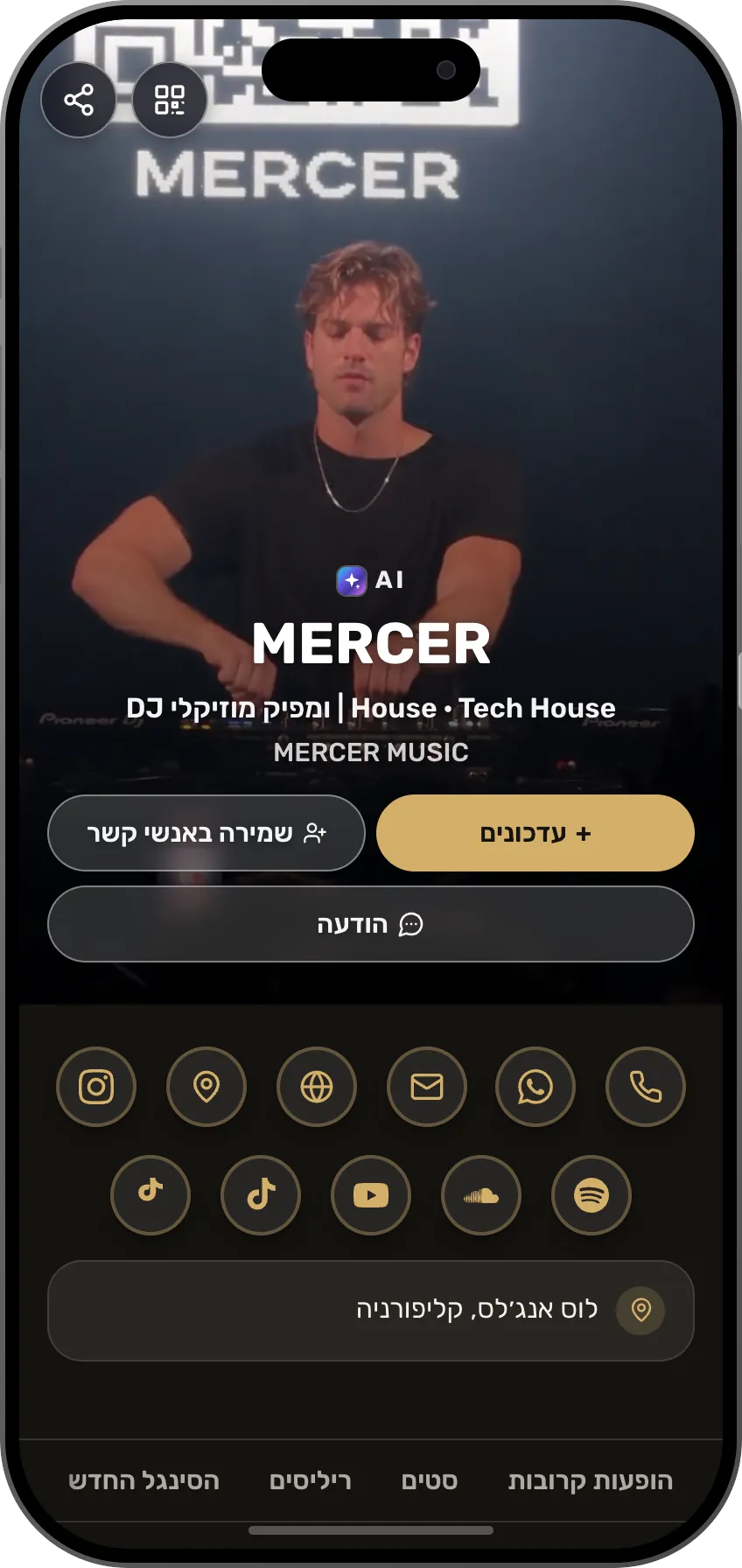
The digital business card for DJs

A DJ does not hand out a phone number, a DJ builds a crowd. Your card gathers the mixes, the monthly gig schedule, the community signup and the booking button, in one link that lives in your Instagram bio.

On this card

  • Music players inside the pageSpotify, SoundCloud, Beatport and YouTube: your sets play without leaving the card.
  • A schedule of shows and eventsDate, venue and one-tap registration. Interested people just show up.
  • A booking calendar inside the cardThe client picks an open slot, you approve, the meeting is set. No phone tag.
  • A gallery that impressesYour results in big, beautiful photos. People see the quality before they call.
Sample digital business card: The digital business card for DJs

Chapter 7

What a digital business card costs

Included in the free plan

The free plan is permanent and includes a complete card, a personal address, a QR code, phone wallet and saving the details of the people you meet. No credit card, no time limit.

On paid plans, with a free trial

The shop, courses, the AI assistant and the team tools open on paid plans. Each plan starts with a 14-day free trial, and you can cancel at any time.

Chapter 8

Frequently asked questions

Do I need to install an app?

No. The card is a web page that opens in any browser, on a phone or a computer. The people who receive it install nothing either.

What happens when someone scans my QR code?

Your card opens, and in one tap they can save you to their contacts, call, message, book a meeting or buy, depending on what you switched on. If you enabled the exchange, the person scanning can leave you their details too.

Can I change the card later?

Yes, at any time. The link and the QR code stay the same, and everyone who already saved them sees the updated version.

Does it work in other languages?

Yes. A card can be in several languages, and whoever opens it sees their own. The product itself is available in English, Hebrew and Russian.

How long does it take to create a card?

A few minutes. A sentence about yourself, a finished card, and changes as needed. You can publish right away and keep improving later.

What about my privacy?

You decide what is shown. Phone and email can be visible only to people who received your personal link, and hidden from the page that appears in search. The card enters Google only with your approval.

How does the free plan differ from the paid plans?

The free plan includes a complete card and everything needed for people to meet and save you. Paid plans lower the selling fee and add courses, extra languages, advanced tools and extra cards, and always start with a free trial.

Further reading

An in-depth article on the blog: the history, the types of cards, and what to check before choosing one.

Read the article

The card that is your personal brand

You are the brand. Whether you're a professional, a freelancer or a creator, people buy from people. Your card is there for them 24/7: beautifully designed, showing what you offer, and saving every lead for you. Start free.

We use essential storage to run MyVisito. Optional analytics, including tools a card owner configured, run only with your permission. Cookie policy