Contacts CRM
You met 30 people last month. How many did you follow up with?
Every hello, remembered
Every exchange, scan and meeting lands in one place, with where you met, why it matters and the next step, so no introduction goes to waste.
- Michal AvidanDesign expoClient
- Dana LeviNetworking meetupFollow up
The dead contact problem
A name and a number fade within a week. Context is what turns a contact into a relationship.
A dead contact
- A name
- A phone number
- An email address
A living relationship
- Where you met, and at which event
- What they care about
- What you promised
- The next step, with a reminder
- A follow-up drafted and ready
How it works
Capture without typing
Exchanges from your card, paper cards scanned in seconds and file imports all land in one CRM.
Keep the context
Tag the event, mark the promising ones, note what matters. Context saves itself with every capture.
Follow up on time
AI drafts the follow-up in your voice, and reminders ring when it's time to return.
A CRM built for meetings
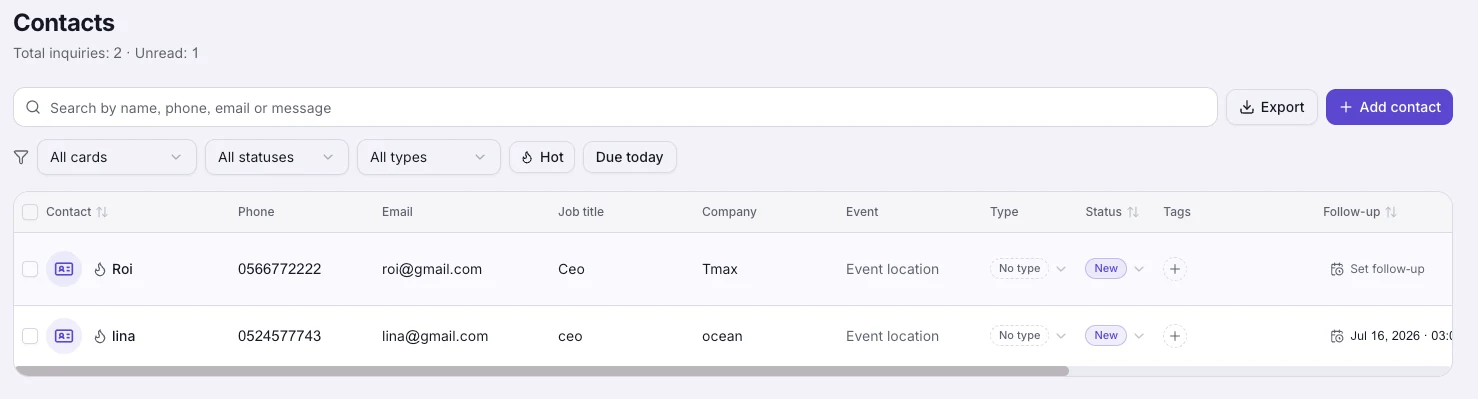
Status, tags, budgets, hot marks and notes, edited inline like a spreadsheet and shared with your team by role.
Follow-ups that write themselves
For every contact, a drafted message and a suggested next step, in your language and theirs. You approve, it sends.
Your leads, in your tools
Every captured contact can flow to HubSpot, Salesforce, Pipedrive, Mailchimp, Google Sheets or any webhook, automatically.
Everything inside
Capture, scan, remember, follow up and sync: five features, one memory.
A networking CRM that remembers who, where and why
A smart contact book that fills itself: who you met, where, why it matters and what to do next, with statuses, tags, reminders and team sharing.
Learn more
A business card scanner that saves the person behind the paper
Photograph any paper business card and AI reads the name, phone, email and company into your contacts, with the card photo and where you met attached.
Learn more
Follow-ups written for you, remembered for you
MyVisito drafts personal follow-up messages from what it knows about each contact, and reminds you when a follow-up is due, by bell and email.
Learn more
Event lead capture that follows you home
Capture leads at conferences and trade shows with a booth QR code, an exchange form on your card, and an AI scanner for paper business cards.
Learn more
Your leads, in your CRM, without copy-paste
Connect your CRM in one click. 14 live integrations: HubSpot, Salesforce, Dynamics 365, Pipedrive, Mailchimp, Klaviyo, Google Sheets, Outlook, an official Zapier app and a public API.
Learn more
A network is not how many people you have met. It is how many remember why you matter.
Frequently asked questions
How do contacts get in?
People leave details on your card, you scan paper cards, visitors book meetings, and you can add contacts manually or import a CSV or vCard file.
Does it replace my CRM?
For meetings and networking it is home base. It also syncs contacts automatically to the CRM you already use.
Can my team share contacts?
Yes, by role: owners and managers see the whole workspace, members see their own contacts.
What does the AI follow-up do?
It drafts a personal message and suggests a next step based on the contact's context. You review and send.
Is scanning paper cards free?
Your first 5 scans are free on every plan. Paid plans and scan credits extend it.
Works even better together
The people you meet are worth remembering
Create the page that is you in a minute: your story, your offers, your payments, and a memory of everyone who says hello. Free, forever.