Relationship memory
A networking CRM that remembers who, where and why
Everyone who exchanges details with you lands in one smart contact book, with the full story: where you met, their role, your notes and the follow-up you promised.
- Michal AvidanDesign expoClient
- Dana LeviNetworking meetupFollow up
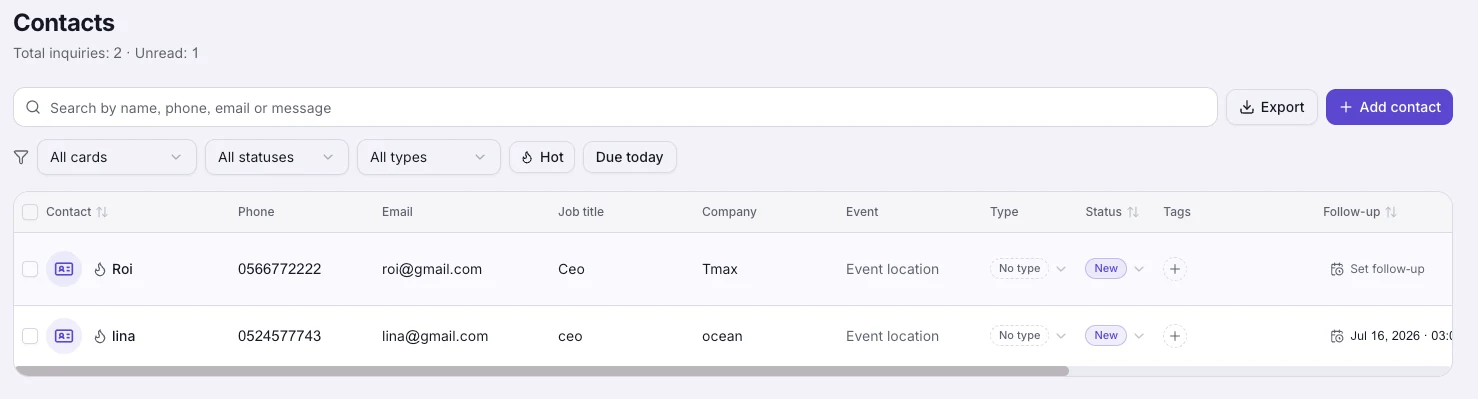
Your contacts, organized like a pipeline
Statuses, tags, hot-lead stars, owners and follow-up dates, all editable right in the table. Filter by event, search by company, and always know who is waiting for your reply.
It fills itself
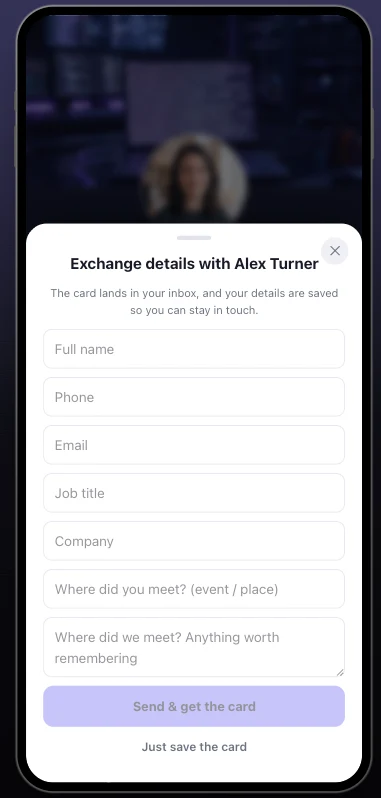
A visitor leaves details on your card, exchanges contacts at a meeting, or you scan their paper card, and the contact appears with the source, the event and the card attached. Manual adding works too, it is just rarely needed.
An updates-signup button on the card
Visitors leave an email in one tap, land straight in your contacts tagged "Updates signup", and sync to your connected integrations like Mailchimp. Your card builds you an audience, free on every plan.
Flows into the tools you already use
Connect HubSpot, Salesforce, Pipedrive, Google Sheets, Mailchimp and more, and every new contact syncs automatically, so your team's CRM stays current without copy-paste.
Bring your contacts with you
Import a CSV or vCard file from HiHello, Blinq, Google Contacts, Outlook or a spreadsheet, and your history lands in the CRM in one pass. Duplicates merge automatically, re-importing the same file is safe, and it is free on every plan.
How it works
Meet people
Exchanges, lead forms, scans and meeting requests flow into your contact book on their own.
Everything is recorded
Source, event, role, notes, statuses, tags and owners, so months later you still know who is who and why it matters.
Act at the right time
Set follow-up dates, get reminded by bell and email, and let the AI draft the message from the contact's story.
Frequently asked questions
How do contacts get into the CRM?
Five ways: visitors leave details through your card's exchange or lead form, you scan paper business cards, you save contacts at meetings with a note, you import a CSV or vCard file, or you add someone manually. Every contact carries its source and, when relevant, the event where you met.
What can I record about each contact?
Status, type, tags, a hot-lead star, the owner on your team, budget, notes, LinkedIn, a follow-up date and where you met. The card photo and original details stay attached.
Will it remind me to follow up?
Yes. Set a follow-up date and when it arrives you get a notification and an email. Change the date and the reminder re-arms.
Does my team see my contacts?
Owners and managers see the whole workspace; each member sees their own contacts. Leads from a member's card are credited to that member automatically.
Can I export my contacts?
Yes, your contacts are yours: export to CSV anytime, or sync them continuously to your CRM through the integrations.
More MyVisito capabilities
The people you meet are worth remembering
Create the page that is you in a minute: your story, your offers, your payments, and a memory of everyone who says hello. Free, forever.